

The Money page
What clients paid you, what your team cost, and what was left, month by month. Here is where each number comes from, and why some bookings are left out of some totals.
The Money page adds up the amounts recorded on your bookings: what clients paid, what you paid your team, and the difference. Open it from Money in the menu.
Every number here comes from what is typed on each booking. Logidex does not connect to your bank or your payment app, so a booking with nothing recorded adds nothing.
Pick a period
Along the top, choose a year or All time. Everything on the page follows that choice, including the export at the bottom.
Which bookings count
Booked, Completed and Canceled bookings count. Inquiries never do, because nothing has been agreed yet.
⭐ Canceled bookings count on purpose. A deposit you kept and any pay that came out of it are both real money.
Happened, and still to come
A booking counts as happened once its date has passed. Anything dated today or later is shown separately, as + still to come under each total, so the big numbers are never inflated by work that has not happened.
The cards at the top
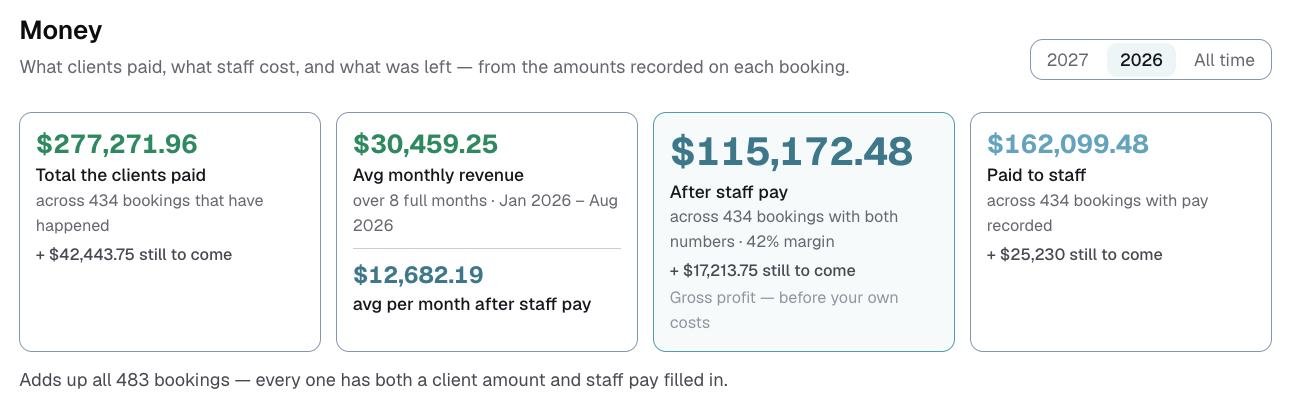
- Total the clients paid: every client amount on bookings that have happened.
- Avg monthly revenue: the client total divided by the number of full months. Underneath it is the same average after staff pay.
- After staff pay: what was left once your team was paid. It shows your margin as a percentage too. See What "After staff pay" means.
- Paid to staff: every pay, travel and extras amount on shifts from bookings that have happened.
How the monthly average works
It only ever uses full months that have ended:
- This year: January through last month. The current month is left out until it is over, so the average does not drop every time you look early in a month.
- A past year: all twelve months.
- All time: from the month of your first booking through last month.
⭐ A month with no bookings still counts as a month. A quiet February earned nothing, and leaving it out would make your year look better than it was.
Until one full month has passed in the period you picked, it shows a dash instead of an amount.
Why some bookings are left out of After staff pay
To say what was left, a booking needs both a client amount and staff pay recorded. A booking missing either one cannot be worked out, so it is left out of After staff pay and its monthly average. The page tells you how many were left out, and the line under the cards tells you when every booking has both.
Blank is never treated as zero. Zero would make a booking look like pure profit, or a total loss.
By month
A bar for each month, showing what clients paid and what you kept. Months that are still in progress or have not yet happened are labeled, so you do not mistake an unfinished month for a bad one.
Top clients, top paid staff and money by city
- Top clients: who paid you the most, and how many bookings.
- Top paid staff: who you paid the most, and for how many shifts.
- Money by city: totals by the city on each booking. Switch between the total and the average per booking, and sort by most money or A to Z. Bookings with no city recorded are counted in a note underneath.
Bookkeeping export
At the bottom, Download CSV gives one row per booking for the same period, ready for your bookkeeper or a spreadsheet. Press Preview first to see it, click a column heading to leave that column out, and choose whether to include the headings row.
A blank in the export means nothing was recorded. It is never filled in with zero.
If you do not see the Money page
It only appears when at least one of the two money switches in Customize → Money is on: Staff pay or Client money. With Staff pay off, the staff cards and columns disappear and the page shows client money only.
Last updated