

Staff login or admin login — which one am I?
Two buttons on the sign-in page. Picking the wrong one doesn't stop you signing in, but it does send you to the wrong place.
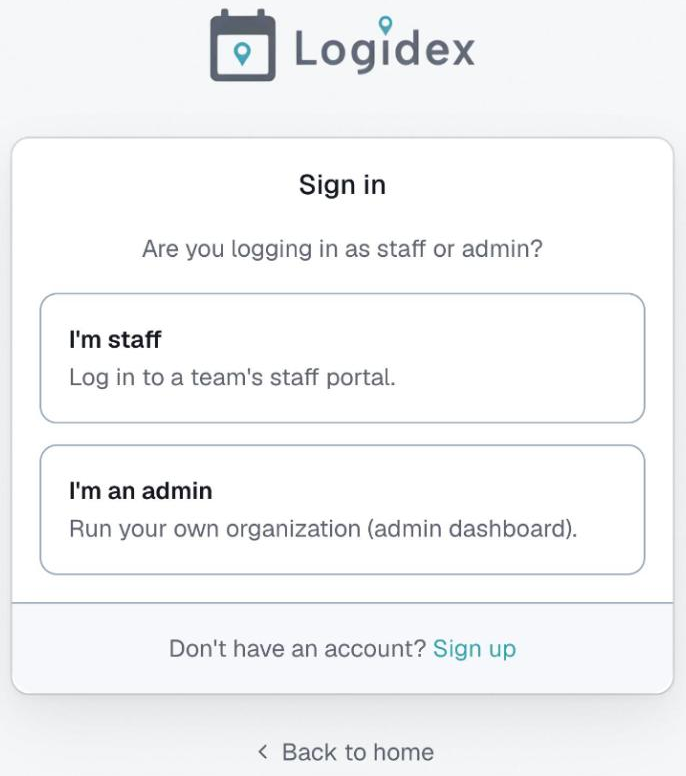
When you go to sign in, Logidex asks whether you are staff or an admin before showing you a password box.
- Staff — you work shifts. You land on your portal: your availability, your shifts, your profile.
- Admin — you run the business, or help run it. You land on the dashboard.
If you picked the wrong one
Nothing breaks. Your email and password work either way — the choice only decides where you land afterwards. Go back and choose the other one.
"Your email and password do not match"
This almost never means the wrong button. It usually means one of two things:
- The email you typed has never had an account. This is by far the most common cause, and it looks identical to a wrong password.
- You are typing the password for a different account.
If you are stuck, ask whoever invited you to send a fresh invite. That gives you a new temporary password directly and skips the reset email entirely.
Some people are both
If you run your own agency and work shifts, you have one login that does both. Sign in as an admin, then use Switch to Staff login in the menu at the bottom of the sidebar.
Last updated