

The Event Card and the Booking Form: which is which
Two screens that both look like a list of fields, doing opposite jobs. One is the question you ask a client. The other is the record you work from — and it decides what the question can be.
Two sections in Customize look like the same thing: a list of fields, both about a booking. They are not, and mixing them up is the most common tangle when you are setting Logidex up.
Here is the whole difference in two sentences.
The Booking Form is a question. It is public, a client fills it in, and you only get to ask what a stranger can answer.
The Event Card is a record. It is private, you and your team work from it, and it holds everything about that job, including things the client never told you.

Two kinds of form
Bookings can reach you through two kinds of form, and Logidex uses the same two names on every screen.
- Your Logidex form is the one Logidex hosts for you. You build it in Customize → Booking Form, and it lives at your /book/ address.
- Your outside form is one you already have somewhere else: Wix, Squarespace, JotForm, Typeform or your own website. You connect it in Settings → Booking intake.
You can use either one, or both at once.
Why the card holds more
Most of what you need to run a job never comes from the client.
Parking you worked out on the phone. The back-up number their assistant gave you. A note that the dog barks. None of that belongs on a public form, and some of it you only learn a week later.
That is why the card is the bigger list. The form feeds it. It does not define it.
Set up the card first
This is the order Logidex assumes, and every screen is built around it.
First: the Event Card. Decide what you need to know to actually run a job. Work backwards from the last time you were standing somewhere wishing you had written something down.
Second: your form. Whichever kind you use, ask the client the part of that list they can answer.
Doing it this way means the form is shaped by the job. The other way round, you build a form, then a card, then discover they do not line up.
The form offers you the card's fields
Once your card exists, open Customize → Booking Form and scroll to the bottom of your question list. Logidex lists every Event Card field that nothing on your Logidex form fills in yet, as a row of chips.
Tap one and it becomes a question, already named and already pointed at that field. The chip then disappears, so the row is always what is still missing. When it is empty, everything you keep is being asked.
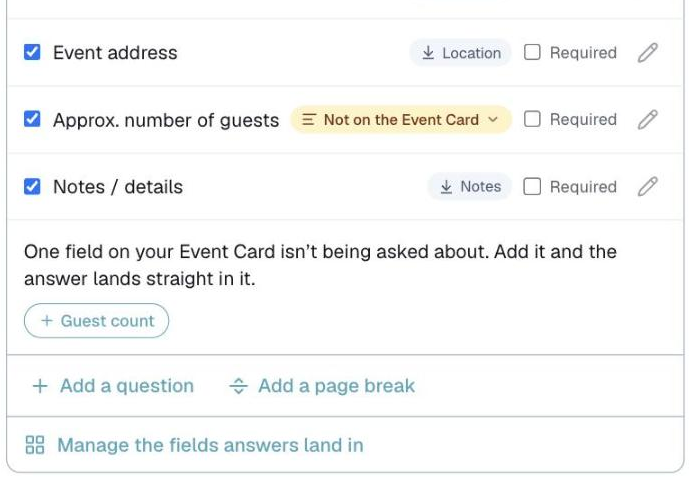
Every question says where its answer goes
Each question on your Logidex form shows a pill with its destination. Tap the pill to change it.
- → Parking means the answer lands in that Event Card field
- Booking notes means it lands in the booking's notes instead
- Email only means it shows up in your new-booking email, and nowhere on the booking. Use it for an answer you want to read once but have no need to keep, like "Ready to book?"
The questions every form starts with (Main contact, Email, Event date, the address and so on) always land in the same place on the card, and their gray pill tells you where. The guest count is the one you can move: tap its pill to send it into one of your own Event Card fields.
One question fills one field. Point a second question at a field that is already taken, and the first one moves out to Booking notes.
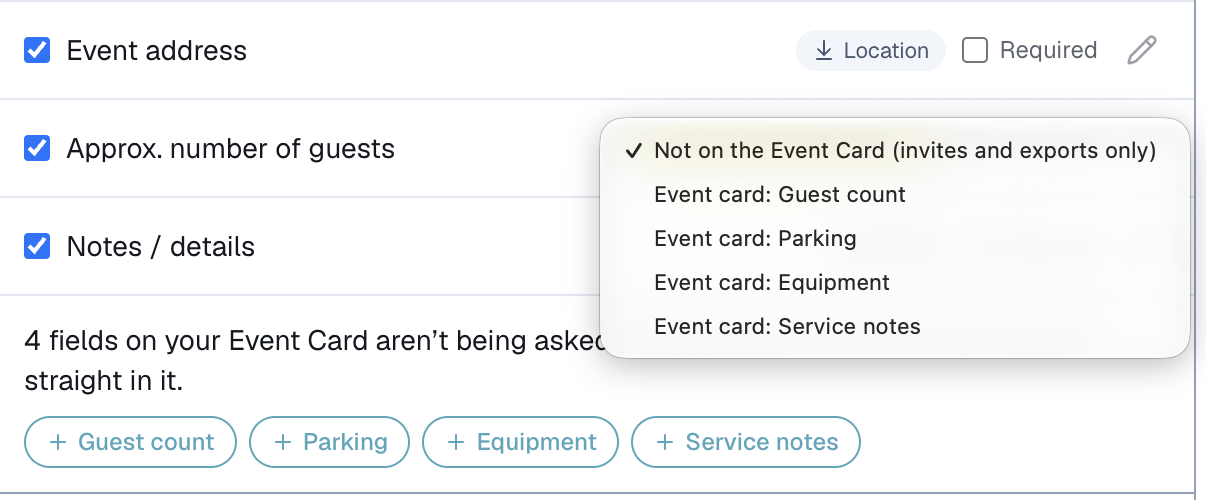
Or start from the Event Card
The same connection shows from the card's side. Open Customize → Event Card and every field you added shows two lines under it:
- Filled by your Logidex form is the question that fills it. You can change it right there, and the pill on Booking Form changes with it.
- Filled by your outside form shows which question on your outside form fills it, if you have one connected. To change that one, follow the link to Settings → Booking intake.
If you already have an outside form
You can keep it. Settings → Booking intake connects it, and you map each of its questions onto your Event Card fields there instead.
The first time you open that mapping screen you will see a row for every question your form sends, often thirty of them. You are not expected to do something with all of them. Find the two or three answers you want kept, point those at a field, and leave every other row exactly as it is. Three changed out of thirty is a finished mapping.
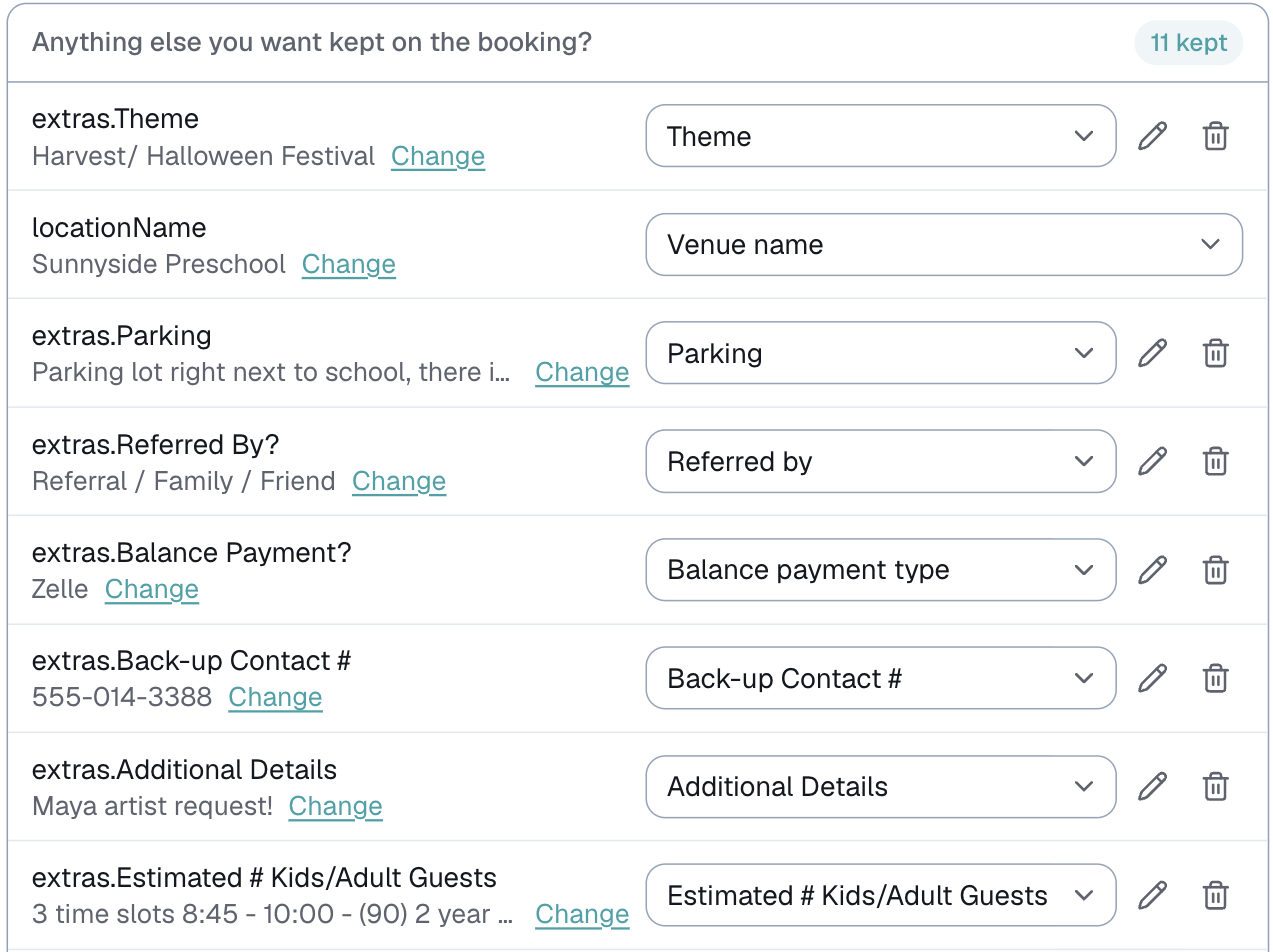
Anything already named the same as one of your Event Card fields arrives filled in for you to check.
Both forms stay live
Connecting an outside form does not switch your Logidex form off. It stays live at your /book/ address, and anyone with that link can still book through it. Both screens say which is connected, so you can see where you stand.
That is deliberate. Plenty of people run both while they test one.
Next: the Event Card and your Google Calendar — how these fields reach the people actually working the job.
Last updated