

Connecting an outside form that can't send headers
If your outside form is built on Wix, Squarespace or a similar builder, it can't send a header. Use the address with your key on the end instead.
Some form builders let you add a hidden setting called a header. Wix does not — there is no field for it anywhere in their Send HTTP request action, and their own support says the same. That is not something you did wrong, and it is not something you can switch on.
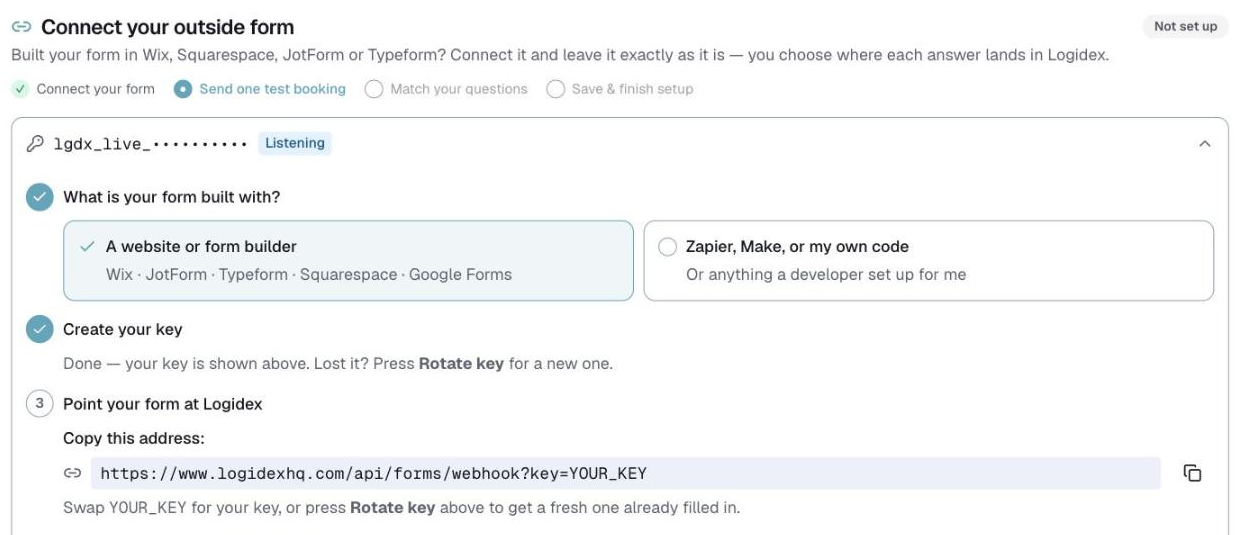
Logidex accepts your key on the end of the web address instead, so nothing needs to be hidden in a header at all.
What to do
- In Logidex, go to Settings → Booking intake.
- Choose Form builders when it asks what your form is built with.
- Create your key, then copy the address it shows you — key and all.
- In Wix, open your form's automation and choose Send HTTP request.
- Set the method to POST and paste the address into the URL box.
- For the body, choose Entire payload.
How to know it worked
Your first real booking is the proof. It arrives held, so you can check the answers landed in the right fields before anything goes live.
Which builders need this
Wix, Squarespace, JotForm and Typeform all need the address-with-key version. Zapier, Make and anything a developer has written for you can send a header, and should.
Last updated