

Your bookings, and the one place you say yes
Where your upcoming work is listed, what each row tells you, and why there is no accept button on your own shifts.
Where your bookings are
Open the Schedule tab. Under My bookings & pay there is a list called Upcoming bookings.
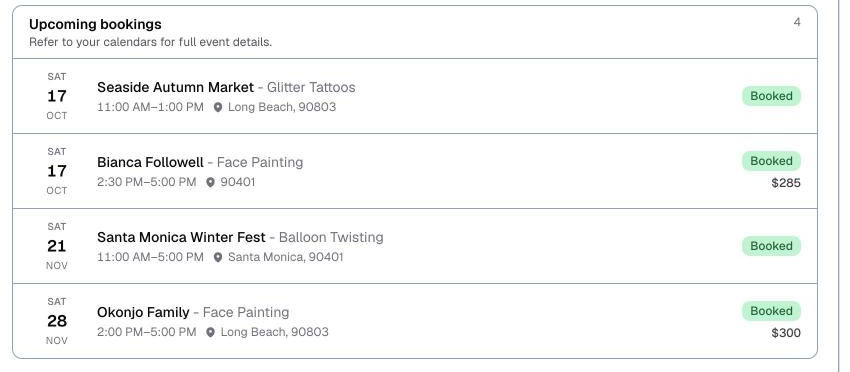
Each row tells you:
- The date, as a day and a number down the left
- The client, and the service you are booked for
- Your start and end time
- Where it is
- A status badge for the booking
- What it pays, if your agency records pay in Logidex
If a booking has been sent to Google Calendar, tapping the row opens that calendar invite, which is where the full details live.
There is no accept button, and that is not a mistake
People look for one, so it is worth saying plainly: you do not confirm your own shifts inside the portal. When your agency wants to book you, they reach out directly by text, email or a call, and they record your answer on their side.
Once you are on a job, it appears in Upcoming bookings. Seeing it there means you are booked.
⭐ If a shift shows up that you did not agree to, or a time looks wrong, contact your agency. Changing it yourself is not something the portal can do.
The one place you do say yes
Coverage needed, at the very top of your portal. It appears when a teammate cannot make a shift and your agency is looking for someone to take it.
Each request shows when, where, what service, the pay if there is any, and a note from the person asking.
Two buttons:
- I can cover this — you are offering, not committing. Your agency still decides and confirms.
- Can't this time — you will not be asked about that one again.
After you say yes, the panel replaces the buttons with a line confirming your agency is deciding. Several people can offer for the same shift, so a yes is not a guarantee you got it.
Your history
At the bottom of the portal, Booking history keeps your running totals: lifetime hours, how many bookings, your pay if your agency records it, and the last twelve months as a small bar for each month.
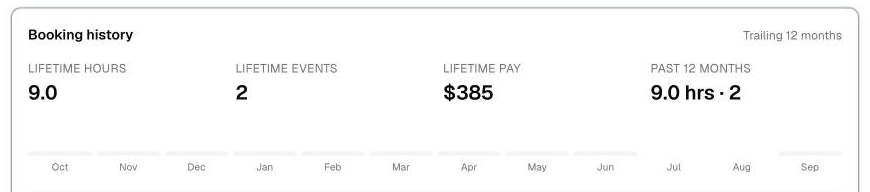
Hovering a bar tells you the hours and how many bookings made it up.
Asking for help with your own shift
That is the Request coverage button at the bottom of the portal, and it only exists if your agency turned it on. How that works is here.
Last updated