

Seeing and changing someone's schedule
Who is free on a given day, how to change a person's schedule yourself, and how time-off approval works.
Availability is your best guess at who to ask. It is not a promise that someone will say yes, and it is not a booking. The point of keeping it current is fewer wasted asks.
Who is free on a day
On the Roster page, switch the view from List to Calendar. It shows the whole month.
Tap a day to see everyone who could work it. Narrow it by Confirmed, Usually or Ask, and use Filters & sort to show one skill only.
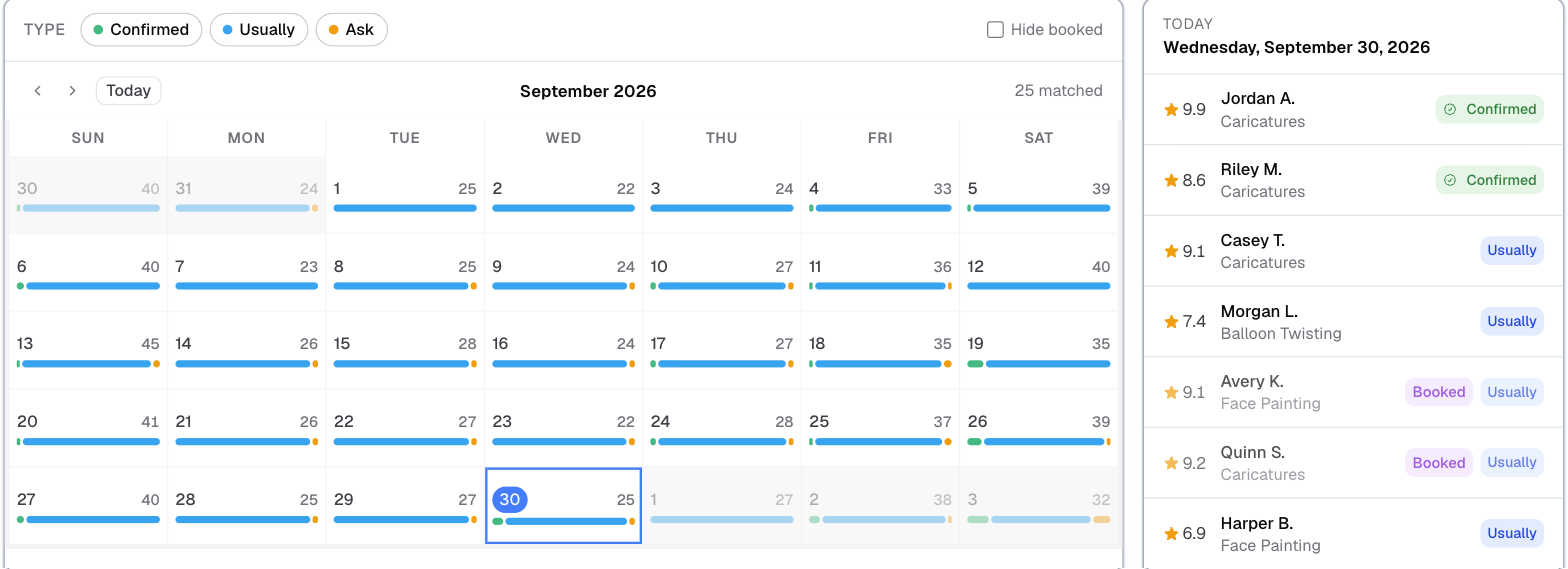
What the colors mean
- Confirmed: they said yes to that date.
- Usually: it is one of their usual days, from their weekly schedule.
- Ask: they are not sure, but want to be asked.
- Not available: the whole day is off.
A confirmed booking marks someone busy on its own, including work for another agency that uses Logidex. You see that they are busy, never who they are working for.
Changing someone's schedule yourself
Open their profile and go to the Schedule tab. You get the same Usual Weekly Schedule and monthly calendar they see in their portal, and the same controls. Setting your availability walks through every one of them.
Handy when somebody tells you over the phone. What you save takes effect straight away.
Approving time off
To have time off come to you first, go to Customize → Contact and turn on Require approval for time off.
With it on:
- Marking a day Not available becomes a request, including the repeat and multi-date options.
- Taking a day off their usual week becomes a request too.
- Adding availability, confirming a day or adding hours still saves instantly. Offering more time never needs your permission.
- Your own changes are never requests. You setting it is the approval.
Requests appear on your Dashboard. Press Approve, or say no and give a reason. They see your answer in their portal.
⚠️ A waiting request does not stop anyone booking them. The day shows an amber flag so you can decide.
Last updated